
[Part-1] Common Networking Devices - Hub, Switch and Router

In my earlier posts while I was explaining how data is transferred - I have mentioned about a few networking devices in their path. In this post - I will dive into the different networking devices and try to explain
a) What each of them do.
b) Similarities or differences between them.
This post will focus on 3 devices - Hub (or ethernet hub), Switch and Router.
Hub (Ethernet Hub)
Hub is a very basic networking device. It can be thought of as similar to a USB hub where you plug different devices into it and expect communication to happen between them. In an ethernet hub, there are multiple ethernet ports connected to the hub and are used to communicate with each other.
Analogy:
I will use an analogy of human communication to explain how things work in a hub. Say, there are 5 people - A, B, C, D and E in a single room. Person A starts a conversation about a certain topic, all others - B, C, D and E hear what Person A is saying. One of them, say Person C decides to respond to A. Everyone else in the room also hears what Person C says.
You could think of cases like - how do we prevent 2 people talking at the same time. There are some common strategies that we humans use.
Each person before they start talking ensures that no one is already talking in the room.
In case two people start talking at the same time, then both would stop and one of them might suggest the other to go first or each waits for a random amount of time and one of them might start talking again.
Hub
The concepts in the analogy directly apply to Hub. Let’s say you have a hub with 5 ethernet ports - 1, 2, 3, 4, 5 and 5 devices connected. This will allow device in each port to talk to all other 4 devices.
Data entering any port is broadcast to all other ports i.e., sent to all other ports except the port of entry.
Communication in the hub happens at layer 1 (Physical Layer) (Refer to my previous post to learn about the different networking layers).
Since all ports communicate in a common medium, there can be collision.
Similar to how people wait till no one else is already talking, each port senses if there is any other port already transmitting data and defer transmission until no other port is transmitting.
Similar to how people take action when two of them start talking at the same time, if a collision is detected then each port will stop and back off for a random time interval before attempting to transmit again.
Since only 1 device can communicate in the hub at any point of time, it can be a bottleneck. The amount of data that can be sent via the hub is also limited to the speed supported by the hub.
You might have never heard about a network hub before. I wouldn’t complain. It is uncommon to find a network hub in this day and age. They are mostly replaced by Switches.
Switch
Compared to a hub, switches are more popular in the networking world. At a high level, switch looks and works very similar to a hub but with some differences.
Switch also has a bunch of ethernet ports and you can connect multiple ethernet devices on to it.
Devices connected to a switch can communicate with each other i.e., send data between them.
Unlike a hub, the data is not broadcast to all other connected devices. Instead data is sent only to the appropriate device.
Analogy
Consider a street (`A street`) with a bunch of houses - 101 to 114.
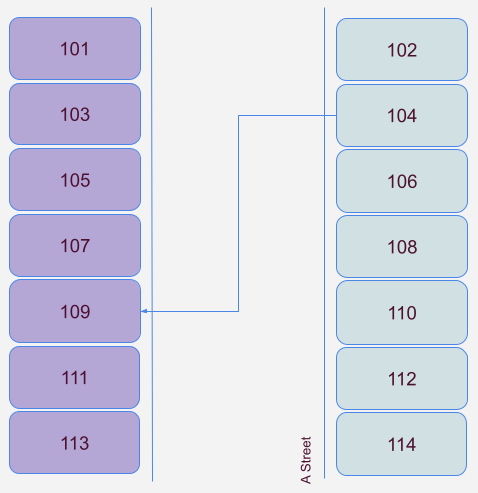
All house are connected to the same street and you could send a package from 1 house to another via the common medium (`A street`).
In the diagram, you can consider that you want to get a package from House # 104 to House # 109. All you have to do is get off your house, enter `A street` and walk towards House # 109 and drop the package (very simple!). You can also imagine that the street has enough room so that there can be multiple people carrying different packages walking on the street at the same time.
Switch
Lets map the analogy to the networking world.
Similar to how each house in the street has a house number, each device connected to a switch also has an address. Switch stores the MAC address of devices connected to each port which will be used for communication.
Communication within the switch happens at layer 2 i.e., source and destination addresses are MAC address. Switch will use its knowledge of the MAC addresses connected to each port and send the data only to the appropriate port.
Switches typically operate in layer 2, but there are also layer 3 switches. To keep things simple, I won’t be covering how layer 3 switch will work in this post.
Just like how the street has sufficient room for multiple people to walk at the same time, switches also have the ability to have separate connection between the different ports such that the problem of collision that we saw in the hub is largely reduced. Hence multiple ports can communicate simultaneously.
Like a hub, switch is also uncommon in a home environment. They are mostly used in an office or work environment. It is also common in a data center.
Switches broadly can be classified into two - the explanation so far is about an unmanaged switch. The other variant is the managed switch which can provide features like enabling or disabling ports, VLAN setup, QoS configuration, better monitoring, etc., I will talk about some of these managed switch features in a future post.
Router
The 2 networking devices we have covered so far - hub and switch operate within a single network i.e., to connect devices that are within a single room, home or a building. Router is the device that can be used to connect devices in different networks eg., your home computer connecting to `Google` server where both the machines are in a different network.
Analogy
Lets build on the previous analogy.
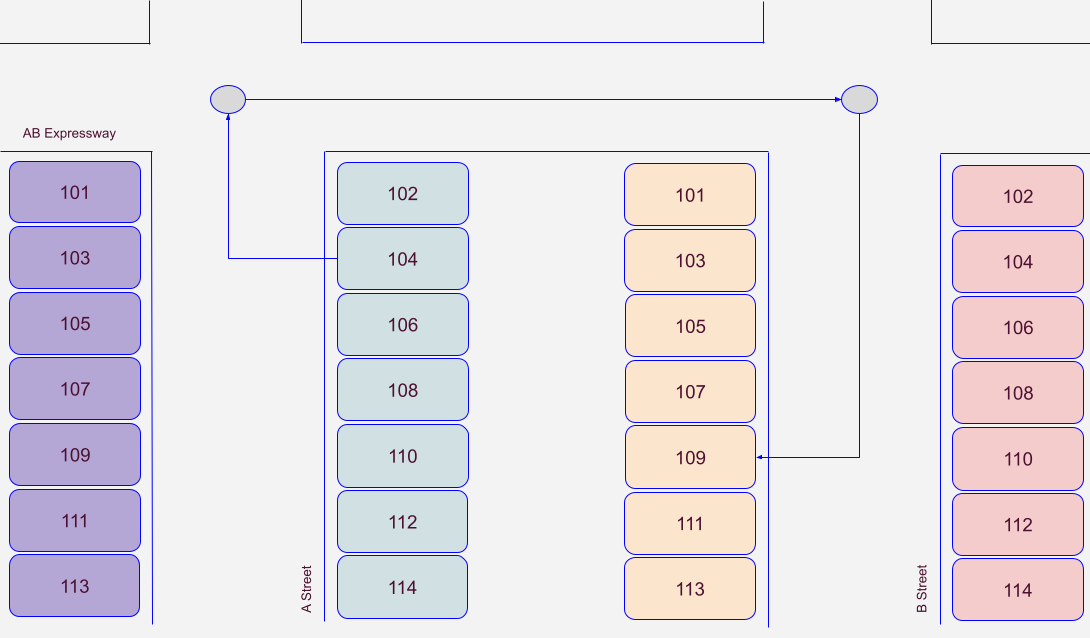
Here, you can see that there are 3 roads - A street, B street and AB Expressway. There are houses in A street and B street and both the streets are connected via AB expressway.
Similar to previous example, you want to send a package from House # 104 to House # 109, but now both the houses are in a different street. In order to carry the package between the streets, you would have to go through an intersection (AB expressway and A street). At the intersection, you decide that the best route to B is to take a `Right` turn and proceed towards B street. Once you reach B street, you would then carry the package to its destination House # 109, B street.
You can see that the different streets have the same house number, but you can distinguish them with the help of street name.
Router
Lets map the analogy to the networking world.
You can think of the different streets as different networks. The different networks are connected via an expressway. Router is like an expressway which connects different networks.
Router operates at layer 3 in the networking stack where the source and destination addresses used are IP addresses. And like switches, data is not broadcasted to all routes but only sent to a single route chosen by the router.
Each street has a local house # which is not unique across streets. Similarly each local network (Local Area Network or LAN) has a local IP address for each of its devices. These local addresses are assigned by the router and can be thought of as a private address.
Eg., Common private IP address ranges are 10.x.x.x, 172.{16-31}.x.x, 192.168.x.x.
Your router will have 2 IP addresses - in addition to a private address there will also be a public IP address that will be used for communicating outside of the local network.
To the outside world, it would seem like all data going out of your network is from a single IP address. Eg., each person in your home may be using a different device and accessing internet, but they all look like they are coming from the same IP address to the Internet.
Unlike hub and switch, router is a very common device that you would have seen and actively use in a home environment. This is the means your home connects to the internet.
The explanation above about the router is very basic in nature and is typically how your home router would work. Home router’s only routing job is to send data from home network to the WAN port.
Routers in your ISP or enterprise networks are more complex in nature though as it runs complex computations to try and find the best route to forward your data.
That’s a wrap for this post. This can be used as an initial read to get a basic understanding of the different devices that participate in computer networks. I will cover about a few more more networking devices in the next post.